
Screenshots

App details
- Version
- 5.15
- Size
- 10.28 MB
- Updated
- June 5, 2024
- Requires
- Windows 11
- Language
- English | Spanish
- License
- Full
- Developer
- Estudios y Proyectos Informáti
- Category
- Windows OS
SoftPas in:
This product is also available in the following languages:
About ABOGest
Download ABOGest – Law Office Management Software for Windows, Mac & Mobile
ABOGest is a powerful, secure, and scalable law office management software designed specifically for legal professionals seeking to optimize their workflow. Whether you're a solo practitioner or managing a growing law firm, ABOGest streamlines case management, client records, document handling, and legal calendar tracking. With its intuitive interface and robust backend powered by Firebird database technology, ABOGest ensures fast access to critical information while maintaining data integrity and security. The software supports multi-user environments, allowing team members to collaborate efficiently with customizable user roles and permissions. From tracking court dates and judge preferences to managing notary appointments and lawyer assignments, ABOGest centralizes every aspect of legal practice. Its advanced search capabilities and seamless integration with Outlook make it a must-have tool for modern law offices. Download ABOGest today and transform how you manage your legal practice with a reliable, free-to-trial software that grows with your firm.
Comprehensive Features That Elevate Legal Practice Management
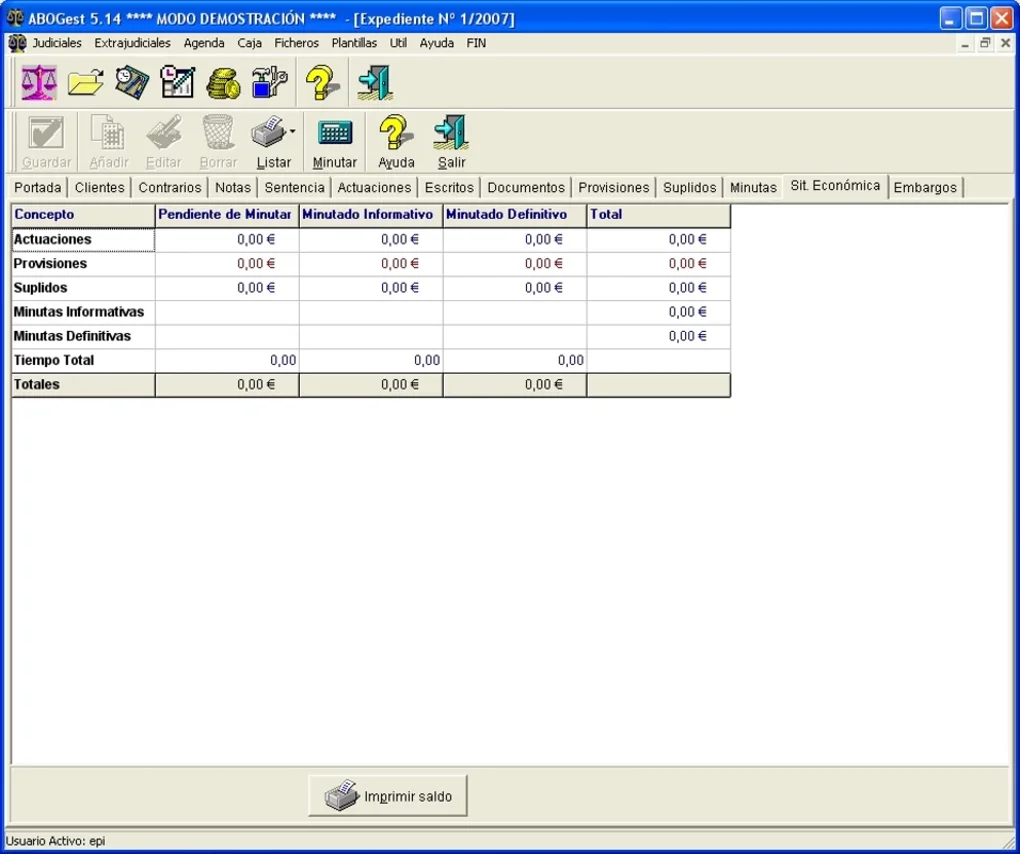
ABOGest stands out in the crowded legal software market due to its rich feature set, thoughtfully designed for real-world legal workflows. At its core, the software provides a centralized digital workspace where attorneys and legal staff can manage all aspects of their cases, clients, and documents. One of the most valuable features is the integrated case management system, which allows users to track case progress from initial consultation to final judgment. Each case can be tagged with relevant details such as court, judge, opposing counsel, deadlines, and document status, ensuring no critical detail is overlooked.
Another standout feature is the advanced search engine powered by Firebird database. Unlike basic search tools, ABOGest enables users to perform complex queries across multiple fields—such as client name, case type, date range, or document type—delivering instant results. This is especially useful in large firms where hundreds of cases may be active at once. The ability to filter and sort data in real time significantly reduces time spent on administrative tasks.
For collaboration, ABOGest supports multi-user access with customizable role-based permissions. Administrators can assign specific roles—such as attorney, paralegal, or administrator—each with tailored access levels. This ensures data privacy and compliance with legal ethics standards. Additionally, the software allows for seamless integration with Microsoft Outlook, enabling users to export client contacts, schedule meetings, and sync calendar events directly from the platform. This integration eliminates the need to switch between applications, improving workflow efficiency and reducing the risk of missed deadlines.
Other notable features include automated reminders for upcoming court dates, document version control, audit trails for all changes, and exportable reports for billing and performance analysis. Whether you're managing a high-volume litigation practice or a small boutique firm, ABOGest adapts to your unique needs with a flexible, future-ready design.
Easy Installation, Intuitive Usage, and Cross-Platform Compatibility
One of the key strengths of ABOGest is its straightforward installation and user-friendly interface, making it accessible even for legal professionals who aren’t tech-savvy. The software is available for Windows, Mac, and Android, ensuring that users can access their data from desktops, laptops, and mobile devices. The installation process is quick and guided, requiring minimal technical knowledge. Once installed, the dashboard presents a clean, organized layout with clearly labeled modules for clients, cases, documents, calendar, and tasks.
Using ABOGest is intuitive. From the moment you open the app, you’re greeted with a customizable home screen that displays your most urgent tasks, upcoming deadlines, and recent activity. Adding a new client or case is as simple as filling out a few fields and uploading relevant documents. The drag-and-drop interface for file management makes organizing case folders effortless. Users can also tag documents with metadata such as case number, document type, and status, which enhances searchability and retrieval speed.
For teams, the software supports real-time collaboration—multiple users can work on the same case simultaneously, with changes synced instantly across devices. This is particularly beneficial for law firms with remote or hybrid teams. The mobile app for Android provides full functionality, allowing lawyers to check case updates, access documents, and respond to client messages while on the go. All data is encrypted both in transit and at rest, ensuring that sensitive legal information remains secure.
Updates are delivered automatically through the software’s built-in updater, ensuring you always have access to the latest features and security patches. This hands-off approach to maintenance reduces downtime and keeps your firm operating smoothly. Whether you're managing a single case or a complex litigation portfolio, ABOGest simplifies the process without sacrificing control or accuracy.
Pros, Cons, and Frequently Asked Questions (FAQ)
- Pros:
- Intuitive, modern interface designed for legal professionals
- Advanced Firebird-powered search for instant data retrieval
- Multi-user support with role-based access control
- Seamless Outlook integration for calendar and contact sync
- Available for Windows, Mac, and Android (no iOS version yet)
- Secure data encryption and audit trails for compliance
- Free trial available with full feature access
- Cons:
- Limited to Windows, Mac, and Android; no native iOS app
- Initial setup may require some training for new users
- Advanced features require a deeper understanding of database logic
- Customer support response time could be faster during peak hours
Frequently Asked Questions (FAQ)
- Is ABOGest free to download and use?
-
Yes, ABOGest offers a fully functional free trial with no credit card required. The trial version includes all core features, allowing users to test the software in real-world scenarios before committing. After the trial, users can choose a subscription plan based on their firm size and needs.
- Can I use ABOGest on my iPhone or iPad?
-
Currently, ABOGest does not have a native app for iOS devices. However, you can access the web version of ABOGest through Safari on iPhone and iPad, which provides most of the core functionality. The Android app offers a more robust mobile experience.
- How secure is ABOGest when handling confidential client data?
-
ABOGest prioritizes data security with end-to-end encryption, secure login protocols, and regular backups. All data is stored locally or on your chosen server, giving you full control over your information. Audit trails track every change, ensuring transparency and compliance with legal ethics standards.
- Can I import existing client and case data into ABOGest?
-
Yes, ABOGest supports data import from CSV, Excel, and other common formats. The import wizard guides you step-by-step to map fields correctly, minimizing errors and ensuring a smooth transition from legacy systems.
- Does ABOGest support multi-language interfaces?
-
Currently, ABOGest is available in English and Spanish. Additional language support is under development and may be released in future updates.
Conclusion: A Reliable Choice for Modern Law Firms
If you're looking for a secure, scalable, and user-friendly law office management software, ABOGest is an excellent choice. Its powerful combination of case management, document control, advanced search, and Outlook integration makes it ideal for both solo practitioners and growing law firms. The software’s cross-platform availability ensures that you can stay connected and productive no matter where you are.
While the lack of an iOS app is a minor drawback, the web and Android versions provide strong alternatives. With a free trial available, there’s no risk in testing ABOGest for yourself. Whether you’re tired of juggling spreadsheets and paper files or seeking a more efficient way to manage your legal practice, ABOGest delivers real value.
Download ABOGest today and take the first step toward a more organized, efficient, and client-focused law practice.
Guides & Tutorials
How to install ABOGest
- Click the Download button above.
- Once redirected, accept the terms and click Install.
- Wait for the ABOGest download to finish on your device.
How to use ABOGest
This software is primarily used for its core features described above. Open the app after installation to explore its capabilities.
User Reviews
No reviews yet. Be the first to share your experience.
You may also like
more
Llama 2
Free-to-use large language model As the new addition to Meta’s arsenal of langua...

NotebookLM
Revolutionizing the note-taking and idea-generation process NotebookLM is an exp...

Github co pilot
AI-inspired software development and coding platform GitHub Copilot is a browser...

Google Gemma
Google’s lightweight AI models Introducing Google Gemma , a family of cutting-ed...

AI Image Enlarger
A free app for Windows, by ai-image-larger. AI Image Enlarger is a free software...

DALL E
AI-driven text-to-image transformation engine DALL·E is a free graphic and desig...